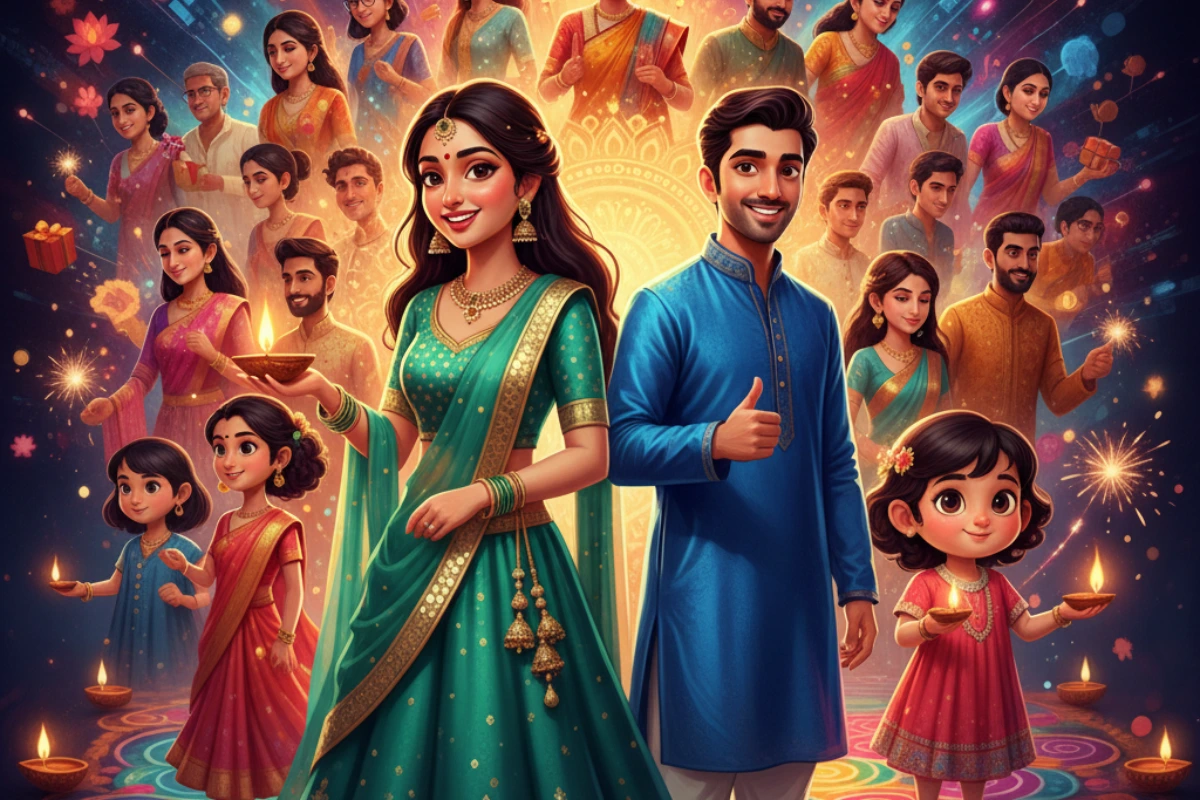
The festive season is upon us, a time for joy, connection, and sharing heartfelt wishes. While traditional cards and Festive AI Avatars and messages hold a special charm, a new wave of innovation is transforming how we celebrate digitally. Imagine sending not just a message, but a vibrant, personalized digital avatar that perfectly captures your festive spirit, created effortlessly with the power of Artificial Intelligence. Thanks to breakthroughs from platforms like Google Gemini, this isn’t just a futuristic dream—it’s today’s reality.
This comprehensive guide will walk you through everything you need to know about creating and sharing your own personalized, AI-generated digital festive avatars using Google Gemini. Get ready to elevate your Diwali greetings, enhance your social media presence, and blend cherished traditions with cutting-edge technology.
The Rise of AI in Festive Celebrations: Why Avatars?
In an increasingly digital world, our online presence often mirrors our real-life celebrations. AI-generated avatars offer a unique way to personalize this digital experience. They go beyond generic filters or stock images, providing a truly unique representation that reflects individual style and festive mood.
The “Festicons” campaign, a recent collaboration between Coca-Cola and Google Gemini, brilliantly showcased this potential, allowing users to craft custom avatars that blend cultural motifs with modern aesthetics. This trend signifies a shift: we’re moving from passive consumption of digital content to active creation, making our celebrations more interactive and personal than ever before.
Getting Started with Google Gemini: Your AI Canvas
Google Gemini isn’t just a chatbot; it’s a powerful multimodal AI capable of understanding and generating various forms of content, including images. While specific dedicated “Festicon” tools might be campaign-dependent, the core capabilities of Gemini allow you to achieve similar, highly personalized results for your festive avatars.
Here’s what you’ll need:
- Access to Google Gemini: Ensure you have access to Google Gemini (either through the web interface or a compatible app).
- A Clear Vision: Think about what you want your avatar to represent. What festive elements are important to you?
Step-by-Step: Crafting Your Personalized AI-Generated Festive Avatar
Creating your avatar with Google Gemini involves clear communication and a bit of creative prompting. Think of Gemini as your digital artist, ready to bring your ideas to life.
Step 1: Define Your Avatar’s Core Identity
Start by describing the central figure of your avatar. Be specific.
Prompt Example:
- “Create a digital avatar of a young Indian woman celebrating Diwali.”
- “Generate an avatar of a cheerful man with a traditional kurta.”
- “Design a playful cartoon avatar of a child holding diyas.”
Step 2: Infuse Festive Elements & Style
This is where you add the magic! Describe the traditional clothing, decorations, and overall atmosphere.
Prompt Examples (building on Step 1):
- “Create a digital avatar of a young Indian woman celebrating Diwali, dressed in a vibrant red lehenga with intricate gold embroidery. She should be holding a glowing diya, with sparklers subtly visible in the background.”
- “Generate an avatar of a cheerful man with a traditional blue silk kurta and white pajamas. He should be smiling, standing in front of a subtly lit rangoli pattern.”
- “Design a playful cartoon avatar of a child holding two glowing diyas, with a background showing blurred Diwali lights and firecrackers.”
Key details to include in your prompt:
- Clothing: (e.g., “saree,” “lehenga,” “kurta,” “sherwani,” “traditional,” “modern,” “fusion,” “pastel,” “bright colors”)
- Accessories: (e.g., “jewelry,” “bangles,” “earrings,” “bindi”)
- Props: (e.g., “diya,” “lantern,” “sweets,” “firecrackers,” “gift box”)
- Background: (e.g., “Diwali lights,” “rangoli,” “temple,” “home interior,” “fireworks display,” “subtle glow”)
- Style: (e.g., “realistic,” “cartoon,” “watercolor,” “oil painting,” “digital art,” “minimalist,” “photorealistic”)
- Mood/Expression: (e.g., “joyful,” “serene,” “excited,” “playful,” “thoughtful”)
- Color Palette: (e.g., “warm tones,” “vibrant hues,” “metallic accents,” “gold and silver”)
Step 3: Iterate and Refine (The Power of Dialogue)
Gemini is conversational. If the first attempt isn’t perfect, tell it what you want to change!
Refinement Prompt Examples:
- “Make the lehenga more emerald green and add more intricate mirror work.”
- “Change the background to a more prominent rangoli design.”
- “Give the man a more subtle smile.”
- “Can you try a more photorealistic style for this avatar?”
- “Add a subtle traditional headpiece to the woman.”
- “Make the sparklers more prominent and vibrant.”
Step 4: Download Your Masterpiece
Once you’re satisfied with your AI-generated avatar, Gemini will provide options to download the image. Typically, you can right-click (on desktop) or long-press (on mobile) the image to save it to your device.
Sharing Your Personalized Festive Avatars
Now that you have your unique creation, it’s time to share the festive cheer!
- Social Media Profile Picture: Update your WhatsApp, Instagram, Facebook, or other social media profile pictures to reflect the festive spirit.
- Digital Greeting Cards: Incorporate your avatar into personalized digital greeting cards that you can send via email or messaging apps.
- WhatsApp/Messaging Apps: Send your avatar directly to friends and family with a personal message.
- Festive Posts: Use your avatar as the centerpiece for your festive social media posts, perhaps sharing a story about its creation.
- Virtual Backgrounds: For video calls, some avatars can be adapted as fun, festive virtual backgrounds.
Tips for Best Results & Advanced Customization
- Be Specific but Concise: While detail is good, avoid overly long, rambling sentences. Break down your ideas into clear components.
- Experiment with Keywords: If something isn’t working, try different descriptive words. “Vibrant” instead of “bright,” or “ornate” instead of “detailed.”
- Leverage Emotional Language: Describe the feeling you want your avatar to evoke (e.g., “joyful celebration,” “serene reflection”).
- Consider Cultural Nuances: When depicting specific cultural wear or practices, ensure your prompts are respectful and accurate.
- Combine Elements: Don’t be afraid to ask Gemini to combine a specific style (e.g., “Pixar animation style”) with festive themes.
- Image Prompts (Future/Advanced): As AI evolves, you might be able to upload a base image of yourself and ask Gemini to “Diwalify” it, adding traditional clothing and festive backgrounds. Keep an eye out for such advanced features!
- Ethical Considerations: Always ensure your prompts create respectful and positive representations. Avoid stereotypes or any potentially offensive content.
Also read: 25 Easy Google Gemini AI Photo Editing Prompts for Couples – Retro Vibe Photo
The Future is Personalized: Why AI Avatars Matter
The ability to create personalized AI-generated avatars marks a significant evolution in digital communication. It moves beyond mass-produced content, empowering individuals to express their unique identity and celebrate cultural events in a way that is both technologically advanced and deeply personal. As AI tools like Google Gemini become even more sophisticated, the possibilities for creative expression during festive seasons—and indeed, every aspect of our digital lives—will only continue to expand.
So, this Diwali, step into the future of greetings. Unleash your creativity with Google Gemini, craft an avatar that truly represents your festive spirit, and share a piece of personalized digital magic with the world. Happy creating, and happy Diwali!